
GoldenDict-NG is dictionary browsing software. Think of it like a web-browser designed to read dictionary files.
GoldenDict-NG is the currently maintained version of GoldenDict.
Installing GoldenDict-NG
1. Download and install the latest version of GoldenDict-NG. Look for Windows-installer.exe and run.
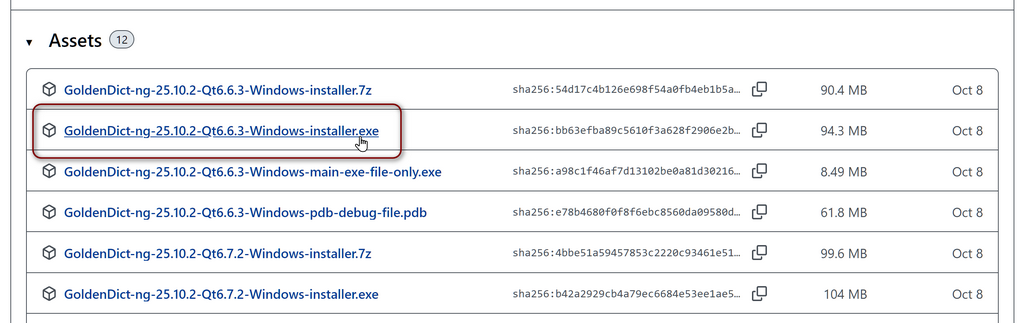
2. Create a folder on your computer to hold the dictionary files. Somewhere easy to access, like documents/dictionaries.
3. Open GoldenDict-NG and go to Edit > Dictionaries > Sources. Then select Add…
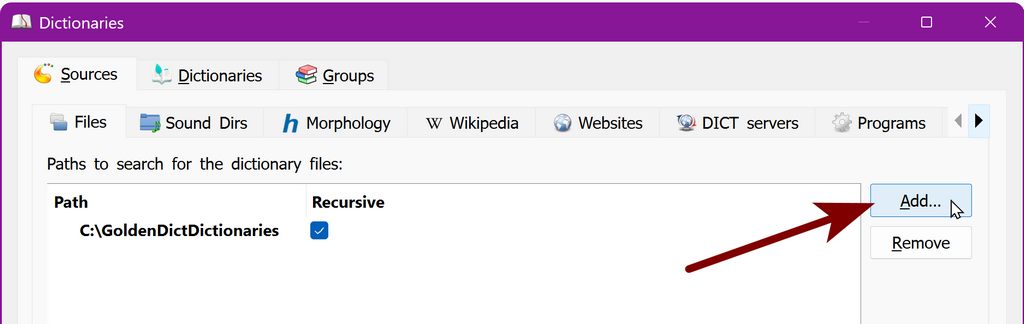
Then choose the folder you created in step 2 above. After adding, make sure that the Recursive option is selected.
Installing the SELD
4. Download and unzip the latest version of the dictionary.
5. Move the unzipped folder into the folder you created in step 2 above.
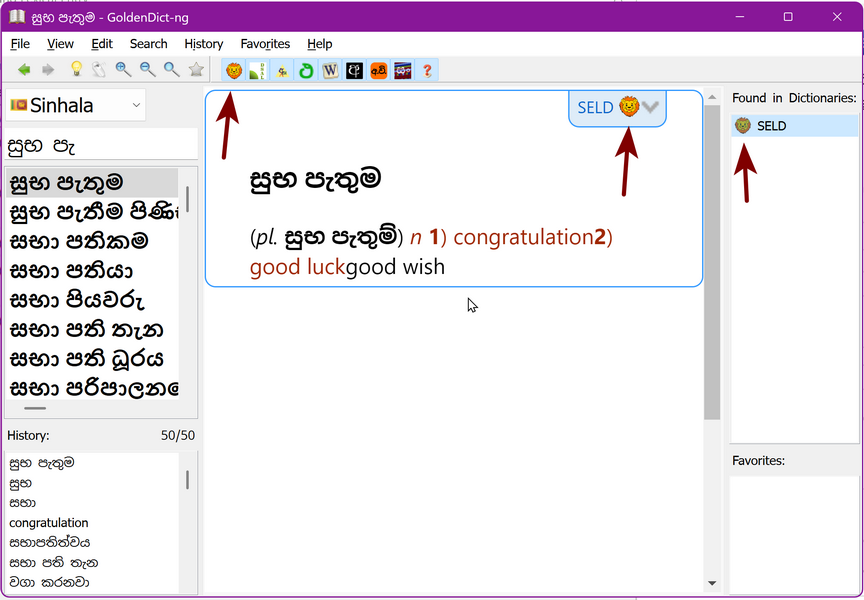
6. Restart GoldenDict-NG and the SELD should appear. Depending on your layout settings you will notice it in several different places.
This video gives an overview of GoldenDict including the Digital Pali Dictionary, another dictionary that can be installed in GoldenDict-NG. The installation instructions start at 4:58. However you want to click on the links above to get the latest version of GoldenDict-NG.